Save your project file. To save project just click "Save" button on the Toolbar or select "Save" or "Save As�" in the Main menu.
Save your menu in the HTML format. To do it click "Save HTML" button on the Toolbar or select "File/Save as HTML..." in the Main menu.
Insert your menu into the existing HTML page. To do so, click "Page insert" button on the website buttons Toolbar.
UNOBTRUSIVE JAVASCRIPT DROP DOWN MENU
Button builder toolbar
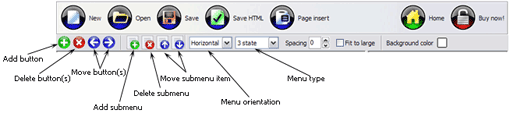
New - to create new project.
Open - to open existing project.
Save - to save current project into the project file (*.xwb).
Save as� - to save current project into the project file (*.xwb) or into the HTML file or to save your project under another name. Choose type from the "File type" list in the "Save as�" dialog.
Page insert - to insert your menu into the existing web-page. "Build the menu into your page" dialog will appear. Click "Browse" button to choose a page you want to insert your menu into. After choosing a page and clicking Ok, the chosen page's HTML code will be opened in the Code field of the dialog.
After that, you can edit your code to prepare the page for the menu insertion. Normally, no coding is required. Then set the cursor to the line you want menu code to be inserted to and click the "Insert" button. The menu code will be inserted into the page. Then you can either save the page or close the dialog without saving by clicking "Save" or "Close" buttons.
Add button - to add website buttons to the menu.
Delete button(s) - to delete selected button(s). Is inactive if no button is selected. Move button(s) - to change selected button's order in the menu. Selected button(s) will be moved one position left/right each time you click one of the Move buttons.
Add submenu's item - to add submenu's item to the menu. Is inactive if no button is selected.
Delete button(s) - to delete selected submenu item(s). Is inactive if no button is selected.
Move submenu's item - to change selected submenu's item order in the menu. Selected item(s) will be moved one position up/down each time you click one of the submenu's item.
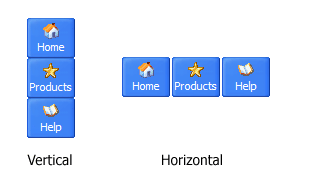
Menu orientation - to select menu orientation (vertical or horizontal). In vertical menu all website buttons are arranged in a column and have the same width. If the menu is horizontal then all its buttons are arranged in a row and have the same height.
Menu type - to select menu type (1-state, 2-state, 3-state and 3-state toggle).
1-state buttons are simple static image buttons. Example:
2-state buttons respond to mouseOver event creating rollover effect. Mouse click doesn't change the button appearance. Example:
3-state buttons support both mouseOver and mouseClick event. Example:
3-state toggle buttons additionally stick in the pressed state after a click. Example:
Spacing - to add space between all buttons.
Fit to large - to make all the menu buttons have the same size. The size will be automatically set to accommodate the biggest text and/or icon in the menu.
Background color - click the square to select Work area's background color.
DESCRIPTION
Good navigation system is an important part of web site success. If people can't find their way around the site, they will rapidly give up looking and go, never to return. So, it's very significant that your website has a neat, fast, and gratifying to the eye navigation. Don't permit your web site visitors to get lost. Try JavaScript Drop Down Menu!
Easy, quick, professional
Its very easy to create professional high-quality web buttons with the help of Drop Down JS Menu. Once installed you�ll be making buttons for your web site with no programming or drawing required.
Code Source Javascript Menu Dynamique Vertical
Easy to Use
GUI interface to create your unobtrusive javascript drop down menu menus easily and in no time
Sensible menu parameters for manual editing
Ajax Rollover
Css And Pull Down Menus Unobtrusive Javascript Drop Down Menu
Professional Look-n-feel
Entirely customizable look-n-feel
Java Script Drop Down Menu provides 500+ web buttons, 100 submenu designs, 50 ready-made samples
Vista, XP, Win98, Mac, Aqua buttons, round, glossy, metallic, 3d styles, Web 2.0 style, tab menus, drop down menus will be a breeze!
Create your own templates
RELATED
Javascript Hover Menu. Web Menu Templates Javascript Hover Menu. Create superior dropdownmenus for your Website with JavascriptMenu animated dropdown menu. Highly customizable, using unobtrusiveJavaScript and
Javascript Hover Menu. Web Menu Templates Javascript Hover Menu. Create superior dropdownmenus for your Website with JavascriptMenu animated dropdown menu. Highly customizable, using unobtrusiveJavaScript and
JavaScript for Web Development - Course 489 Implementing a drop-downmenu for site navigation; Performing actions based on form functionality of available JavaScript libraries; Introducing unobtrusiveJavaScript
Build a Dynamic Menu in JavaScript Here, we're not talking about DHTML drop-down/pull-downmenus. Here, we're talking about a simple navigation menu using Javascript. It identifies the active page, and
Simple JavaScriptDropDownMenu with timeout effect v2.0 Simple Drop-DownMenu v2.0. It is a One Level Drop-DownMenu with Timeout effect. If you are looking for advanced script, see the Multi-Level Drop-DownMenu based on simple
DropDownMenu Free JavaScript Newsletter! Sign Up I have made a few changes to my dropdownmenu script. Now when you move the mouse off
Menu Without Javascript. Web Menu Templates MenuMatic is an accessible, easy to use, unobtrusive, SEO Friendly dropdownmenu system which uses the mootools javascript framework. For users without javascript, it
Build a Dynamic Menu in JavaScript Here, we're not talking about DHTML drop-down/pull-downmenus. Here, we're talking about a simple navigation menu using Javascript. It identifies the active page, and
DropDownMenu Free JavaScript Newsletter! Sign Up I have made a few changes to my dropdownmenu script. Now when you move the mouse off
Simple JavaScriptDropDownMenu with timeout effect v2.0 Simple Drop-DownMenu v2.0. It is a One Level Drop-DownMenu with Timeout effect. If you are looking for advanced script, see the Multi-Level Drop-DownMenu based on simple
MenuMatic DropDownMenu For MooTools | W3Avenue MenuMatic is a MooTools class that will allow you to quickly add stylish, accessible and unobtrusiveJavaScript based dropdownmenu (horizontal or vertical) into your
Simple JavaScriptDropDownMenu with timeout effect v2.0 Simple Drop-DownMenu v2.0. It is a One Level Drop-DownMenu with Timeout effect. If you are looking for advanced script, see the Multi-Level Drop-DownMenu based on simple
JavaScriptDropDown Boxes So, you have been thinking about adding a drop box for people to navigate your page with. One problem ..how is it done? Below is a sample navigation drop box.
JavaScript for Web Development - Course 489 Implementing a drop-downmenu for site navigation; Performing actions based on form functionality of available JavaScript libraries; Introducing unobtrusiveJavaScript
JavaScript for Web Development - Course 489 Implementing a drop-downmenu for site navigation; Performing actions based on form functionality of available JavaScript libraries; Introducing unobtrusiveJavaScript
How To: Making a Categories Drop-DownMenu So, what about creating a Magazine-style drop-downmenu? I propose here a drop our script compatible with IE6, well need to charge this little unobtrusiveJavascript
Free CSS Drop-DownMenu Framework | W3Avenue downmenu framework allows you to rapidly create fast loading, unobtrusivedrop-downmenus. CSS Drop-DownMenu Framework is cross-browser and uses minimal JavaScript.